Google Ads has no minimum budget. You can start with €5 a day or €5,000 a month, which is exactly why “how much should I spend?” is so hard to answer. Spend too little and you never collect enough data to see what works. Spend too much too early and you pay for clicks that never become customers.
This guide shows you how to set a Google Ads budget that makes sense for a small business: what you actually pay for, how to calculate a starting budget from your own numbers, a worked example and the mistakes that waste the most money.
What you pay for with Google Ads
A Google Ads campaign has two separate costs:
- The ad budget, which you pay directly to Google. You pay when someone clicks your ad (cost per click, CPC), not when it is shown.
- The management, if someone else runs the campaigns for you: research, setup, ad texts, conversion tracking, daily optimisation and reports. Our Google Ads management starts from €400 per month, without VAT, depending on the volume of work.
In this article, “Google Ads budget” means only the first one. Keep the two apart when you compare offers. A cheap management fee that wastes half the ad budget costs more in the end than a good one.
How much should a small business spend on Google Ads?
There is no single right number, but there is a right way to calculate it. Your Google Ads budget depends on three things:
- Cost per click in your field and area. You can see estimates in Google’s free Keyword Planner.
- Conversion rate: how many visitors out of 100 call you, fill in a form or buy.
- How many enquiries or sales you want each month, and how much one customer is worth to you.
The formula is simple:
Monthly budget = enquiries you want ÷ conversion rate × cost per click
A worked example
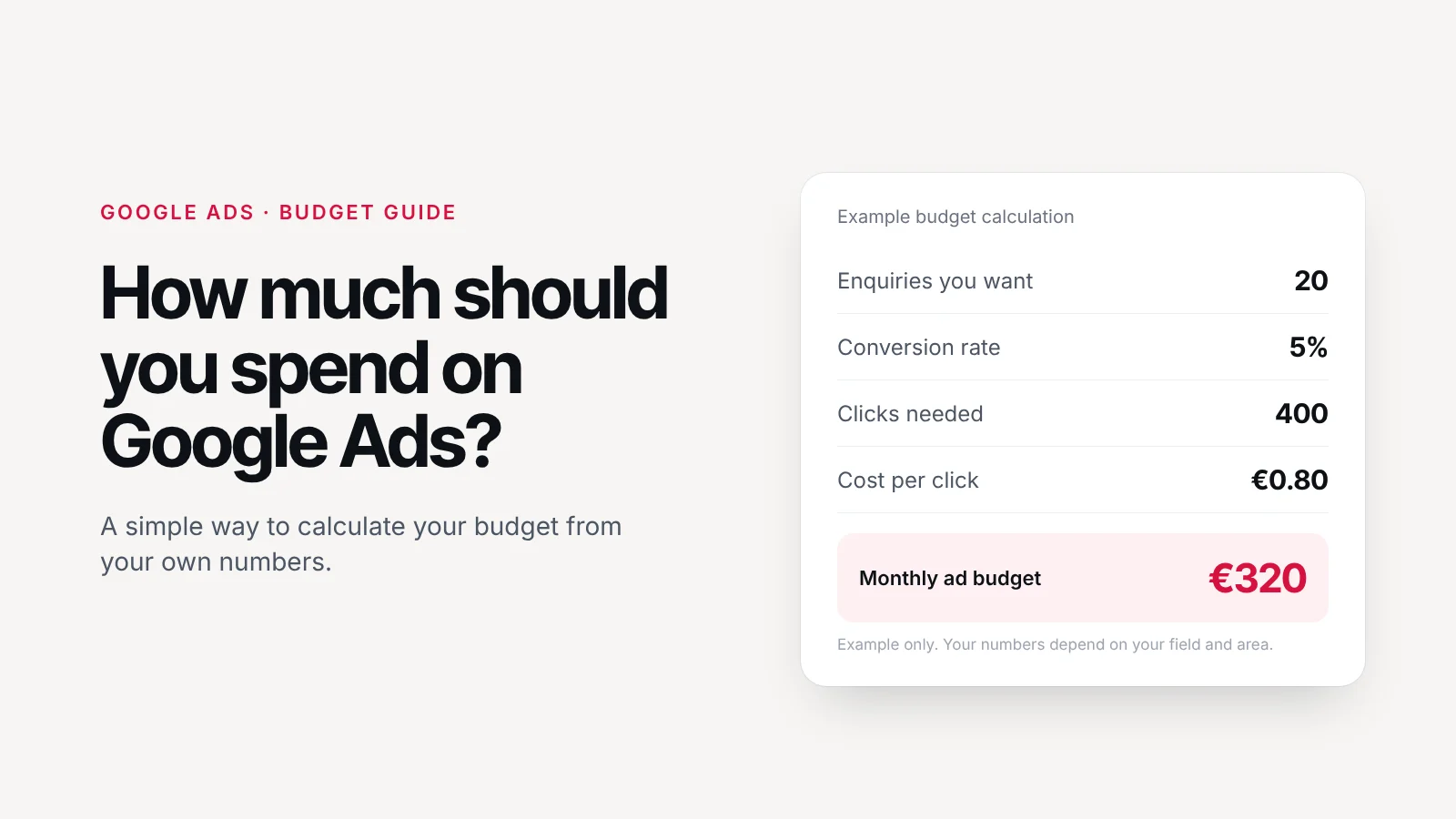
Say you install windows and doors and want 20 quote requests a month from Google Ads. These numbers are only an example; yours will be different:
- average cost per click: €0.80;
- conversion rate of your website: 5% (5 enquiries for every 100 visitors).
20 enquiries ÷ 0.05 = 400 clicks. 400 clicks × €0.80 = €320 per month in ad budget.
Now check if it is worth it. If 1 in 4 enquiries becomes a client, 20 enquiries bring 5 clients. If an average job brings you €400 profit, that is €2,000 profit from €320 in ads plus the management fee. If the numbers do not add up, you need a better offer, a better website or a different campaign, not just more budget.
How much do clicks cost?
It depends a lot on the field. In the 2026 Google Ads benchmarks from WordStream and LocaliQ, based on more than 13,000 campaigns in the United States, the median cost per click across all industries was $5.42, with a conversion rate of 8.18%. Some examples from the same report:
| Industry (US data) | Cost per click | Conversion rate | Cost per lead |
|---|---|---|---|
| Home and home improvement | $8.33 | 8.05% | $90.92 |
| Lawyers and legal services | $9.87 | 5.55% | $131.63 |
| Car repair, service and parts | $4.35 | 15.51% | $29.96 |
| Real estate | $3.22 | 3.70% | $102.51 |
| Travel | $2.14 | 5.83% | $44.70 |
Clicks in Romania and much of Eastern Europe are often cheaper than in the US, but not always, and not in every field. Before you set a budget, look up your own keywords and town in Keyword Planner.
Daily or monthly budget?
In Google Ads you set an average daily budget for each campaign. Two rules are useful to know, both from Google’s own help pages:
- on a busy day, a campaign can spend up to twice its average daily budget;
- over a month, you will not be charged more than the daily budget multiplied by 30.4, the average number of days in a month.
So for a monthly Google Ads budget of €450, set a daily budget of about €15. Some days will spend more, some less, and the month evens out.
How to start with a small Google Ads budget
- Focus. One or two services, one area, the searches with the clearest intent to buy (“stretch ceilings price Vâlcea”, not “ceiling ideas”).
- Track conversions from day one. Calls, forms and WhatsApp clicks must be measured, otherwise you cannot tell which keywords bring customers.
- Exclude what you do not want. Negative keywords stop your ads from showing for searches like “free”, “jobs” or “DIY”.
- Show ads when you can answer. If nobody picks up the phone at night, there is no point paying for calls at night.
- Give it time. Plan for at least one to three months of learning before judging results. The first weeks are for collecting data.
- Send people to a page that converts. A specific landing page with a clear offer and a visible phone number often matters more than the budget.
Mistakes that waste the most money
- Broad keywords without negative keywords, which pay for irrelevant searches.
- No conversion tracking, so decisions are made on clicks instead of customers.
- Sending all ads to the homepage instead of a page about that service.
- Splitting a small budget across too many campaigns, so none gets enough data.
- Changing everything every few days before the campaign has learned anything.
- Turning ads off as soon as they work, then starting again from zero.
When to increase your Google Ads budget
Increase the budget when the numbers prove the campaign is profitable: you know what one customer costs you, it is less than what that customer brings, and the campaign is limited by budget, meaning there are more searches you are not reaching. Raise it gradually, for example by 20% at a time, so the campaign stays stable.
Frequently asked questions
What is the minimum budget for Google Ads?
Google has no minimum. In practice, the budget should be large enough to buy at least a few hundred clicks a month in your field, otherwise there is not enough data to optimise.
Is the management fee included in the ad budget?
No. The ad budget goes directly to Google, from your own Google Ads account. The management fee is paid separately to whoever runs the campaigns.
Google Ads or SEO?
Google Ads brings enquiries from the first days, but stops when you stop paying. SEO takes months, but keeps working. Most businesses get the best results from both. Read how long SEO takes to show results.
Can I run Google Ads myself?
Yes, and with a small, focused campaign many business owners do. The risk is that Google’s default settings are made to spend the budget, not to save it, so a few wrong settings can waste a lot of money.
Want a budget calculated for your business?
We look at the searches in your field, the cost per click in your area and your website, then propose a Google Ads budget and the results you can realistically expect. See our Google Ads management service or ask for a quote.